Circle Area Calculator: 7 Shapes, Formula & Examples
This circle area calculator finds the area of a circle, semicircle, quarter circle, sector, segment, annulus (ring) or annular sector. Select the shape, enter its measurements, and read the result in square feet, square metres, acres, hectares and more. Formulas and worked examples for every shape are below the tool.
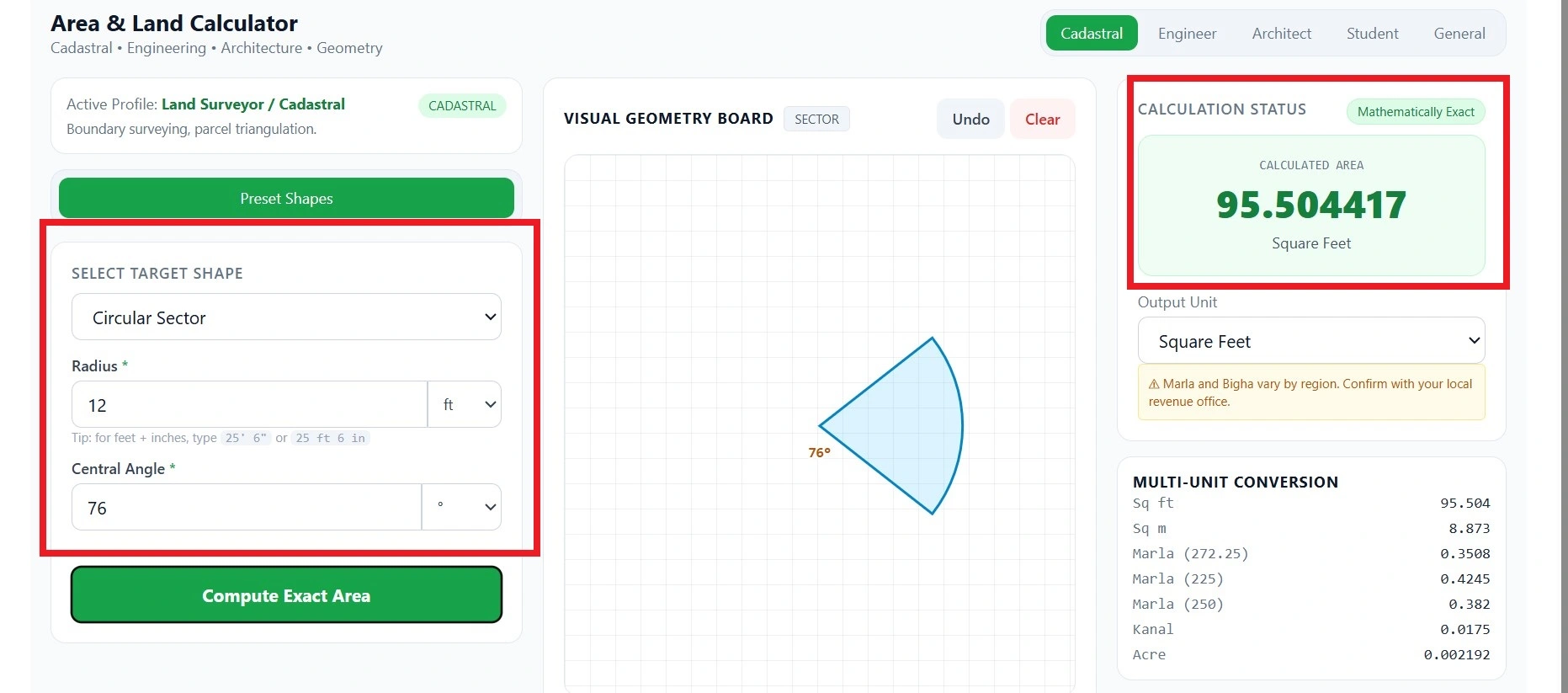
How to Use the Circle Area Calculator
- Select the shape from the dropdown: Circle, Semicircle, Quarter Circle, Sector, Segment, Annulus (Ring) or Annular Sector.
- Enter the measurements that shape needs. The table below shows exactly which ones. Decimals work, and so do feet-and-inch entries such as
25' 6". - Choose the units. Pick the length unit that matches how you measured. The default is feet, so change it if you used metres, centimetres or another unit. For angles, choose degrees, DMS, radians, grad or mil.
- Choose the area unit for the main result, such as square feet, square metres, square yards, acres or hectares. A fixed panel also shows several common units at once, whichever unit you select.
- Use the output options if you need them. You can copy the result, print or save it as a PDF through your browser’s print dialog, download the diagram as a PNG, or estimate a total cost from an area rate.
If you only know the diameter, divide it by 2 first, because the calculator asks for the radius.
Which measurements does each shape need?
| Shape | Required Measurements |
|---|---|
| Circle | Radius |
| Semicircle | Radius |
| Quarter Circle | Radius |
| Sector | Radius and central angle |
| Segment | Radius and chord length |
| Annulus(Ring) | Outer radius and inner radius |
| Annular Sector | Outer radius, inner radius and central angle |
All entries must be positive numbers. The formulas below show how each result is calculated, so you can check any answer by hand.
Circle Area Formula (A = πr²)
The area of a circle equals pi multiplied by the radius squared.
A=πr²
- A is the area, the amount of flat space inside the circle.
- r is the radius, the distance from the centre to the edge.
- π (pi) is a constant, about 3.141592653589793, that links a circle’s size to its width.
Using the radius
Square the radius, then multiply by π. For a radius of 10 m:
A=π(10)2=100π≈314.1593 m2
Using the diameter
The diameter crosses the circle through the centre and is twice the radius, so r = d/2. Substituting gives:
A = πd² ÷ 4
A circle with a diameter of 20 m has a radius of 10 m and the same area as above. In the calculator, halve the diameter before typing it in.
Using the circumference
The circumference (C) is the distance around the circle. If you know it, the area is:
A = C² ÷ (4π)
This is a mathematical relationship only, because the calculator has no circumference input. To use the tool, find the radius first with r = C ÷ 2π (see the radius section below).
Why the answer is in square units
Area counts how many unit squares fit inside a shape. If the radius is in metres, you are counting squares that are 1 m by 1 m, so the answer is in square metres (m²). That is why m² and ft² carry a small 2.
3.14 or full-precision π?
π never ends, so every decimal is an approximation. Using 3.14 gives a quick, rough answer. The calculator uses the full-precision value built into JavaScript (Math.PI). For a radius of 10 m, 3.14 gives 314 m², while the full value gives 314.1593 m².
Area Formulas for All Seven Circular Shapes
| Shape | You Need | Area Formula | Relation to a full circle |
|---|---|---|---|
| Circle | r | A=πr² | The whole shape |
| Semicircle | r | A = πr² ÷ 2 | Exactly half |
| Quarter Circle | r | A = πr² ÷ 4 | Exactly one quarter |
| Sector(degrees) | r, θ | A = (θ ÷ 360) × πr² | A pizza-slice piece |
| Segment(θ in radians) | r, chord c | A = ½ × r² × (θ − sin θ) | The piece cut off by a straight chord |
| Annulus | R, r | A = π×(R² − r²) | Big circle minus small circle |
| Annular Sector | R, r, θ | A = (θ ÷ 360) × π × (R² − r²) | A slice of a ring |
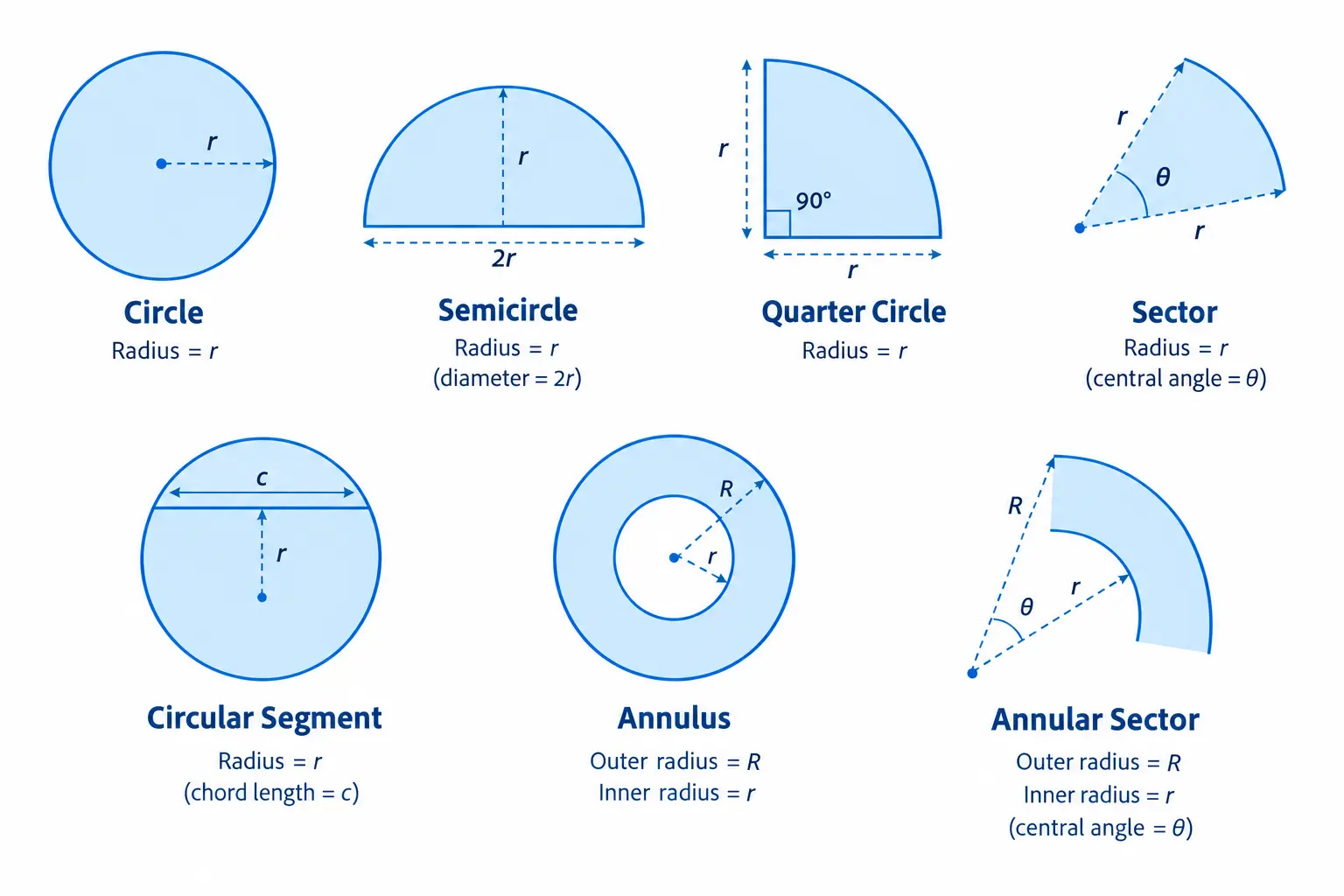
Mind the angle unit. The sector and annular-sector formulas above use degrees. The segment formula uses radians, because the sine function inside it expects radians. In the calculator you can enter an angle in whichever unit you prefer, and it handles the conversion (see the angle units section).
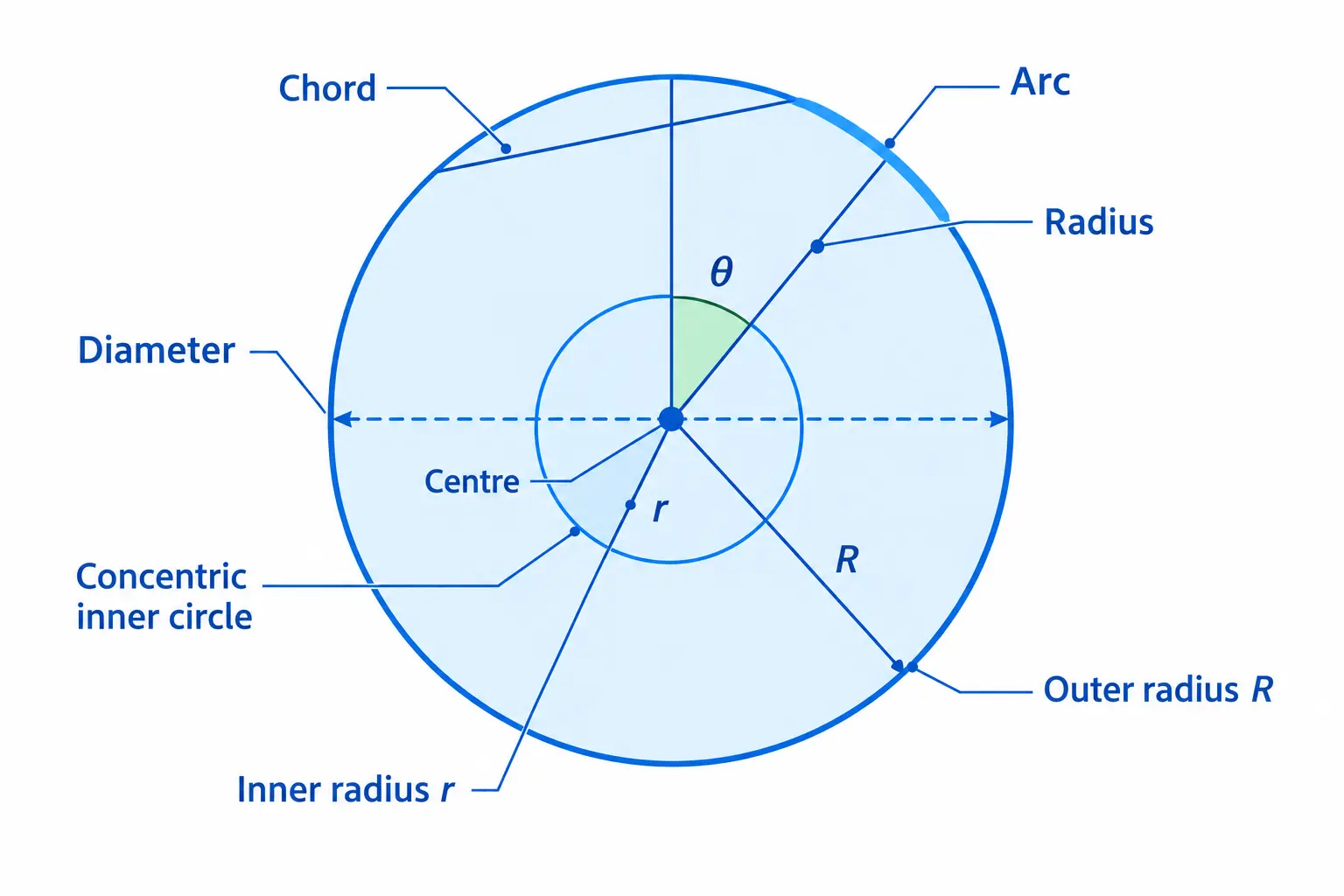
Parts of a Circle Used in Area Calculations
These are the terms you will meet in the formulas and in the calculator’s inputs.
- Centre: the midpoint, equally far from every point on the edge.
- Radius (r): centre to edge. Most formulas start here.
- Diameter (d): straight across through the centre, so d = 2r.
- Circumference (C): the distance around the circle, 2πr.
- Arc: any curved piece of the circumference.
- Chord: a straight line joining two points on the circle.
- Central angle (θ): the angle between two radii at the centre.
- Outer radius (R) and inner radius (r): the two radii of a ring, which share one centre.
Sectors, segments and annuli are explained in their own sections below.
Area of a Semicircle (Half Circle)
A semicircle is half a circle, cut along a diameter. Its area is half the full-circle area:
A = πr² ÷ 2
Worked example
A semicircular window has a diameter of 7 m.
- Radius: 7 ÷ 2 = 3.5 m
- Area: π × 3.5² ÷ 2 = π × 12.25 ÷ 2
- Area ≈ 19.2423 m²
The diameter must be halved because the formula uses the radius. Using 7 as *r* would give an area four times too large before the halving.
Area versus perimeter
Area measures the space inside. Perimeter measures the distance around the edge. A semicircle’s edge is the curved arc plus the straight diameter:
P=πr+2r
For r = 3.5 m, the perimeter is about 17.9956 m. One answer is in m², the other in m, so never mix them.
Sector and Quarter Circle Area Formula
A sector is the part of a circle between two radii and the arc that joins them, like a slice of pizza. The angle between the two radii is the central angle, written θ. A sector covers the same fraction of the circle as its angle does of 360°.
Formulas
For an angle in degrees:
A = (θ ÷ 360) × πr²
For an angle in radians:
A = ½ × r² × θ
Example 1: a quarter circle
A quarter circle is a sector with a 90° angle. With r = 3 m:
A=(90/360)×π×(3)^2=9π÷ 4≈7.0686 m2
Example 2: a 120° sector
With r = 8 m and θ = 120°:
A=(120/360)×π×(8)^2=64π÷ 3≈67.0206 m2
Arc length and sector perimeter
The arc is the curved edge of the sector:
L = (θ ÷ 360) × 2πr
For the 120° example, the arc is about 16.7552 m. The sector’s perimeter adds the two straight radii: 16 + 16.7552 ≈ 32.7552 m. This is a length, not an area, so it does not belong in the area formula.
Angle Units: Degrees, Radians, Grad, Mil and DMS
For the Sector and Annular Sector shapes, you can enter the angle in the unit you already have. These are the same angle written in different ways.
| Unit | Full Turn | A 90° angle is |
|---|---|---|
| Degrees (°) | 360 | 90 |
| Radians | 2π ≈ 6.2832 | π/2 ≈ 1.5708 |
| Grad | 400 | 100 |
| Mil | 6,400 (NATO standard) | 1600 |
| DMS | 360° | 90° 0′ 0″ |
DMS means degrees, minutes and seconds. One degree has 60 minutes, and one minute has 60 seconds. So 45° 30′ 0″ is 45.5°.
The calculator uses the NATO mil convention, where one full turn equals 6,400 mils. Some artillery and surveying systems use 6,000 mils per turn instead, so check which standard your source uses before entering a value.
Use the unit printed on your drawing, instrument or textbook. If you enter 120 but choose the wrong unit, the answer will be wrong, so check the unit selector before reading the result.
Area of a Circular Segment
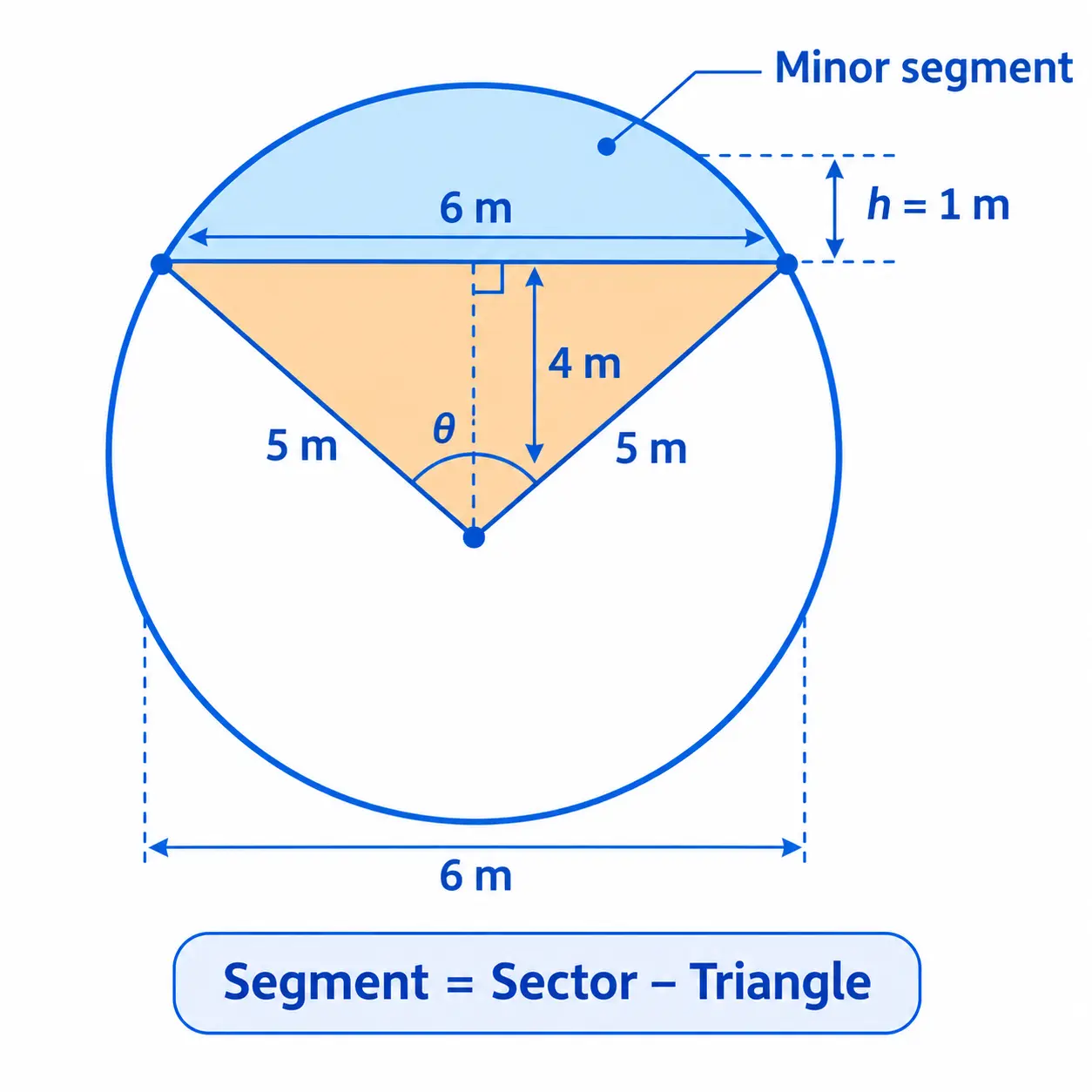
A sector reaches the centre. A segment is the D-shaped or bow-shaped region between a chord (a straight line joining two points on the circle) and the arc above it.
The minor segment is the smaller piece. Its area is the sector area minus the triangle formed by the two radii and the chord:
A = ½ × r² × (θ − sin θ)
Here θ must be in radians. In the calculator you only enter the radius and the chord length, and the central angle is worked out from them.
Worked example: radius 5 m, chord 6 m
Step 1: find the central angle. The chord and angle are linked by c = 2r sin(θ/2), so:
sin(θ/2)=6/(2×5)=0.6
That gives θ/2 ≈ 36.8699°, so θ ≈ 73.7398°, or ≈ 1.2870 radians.
Step 2: triangle area. ½ r² sin θ = ½ × 25 × 0.96 = 12 m².
Step 3: sector area. ½ r² θ = ½ × 25 × 1.2870 ≈ 16.0875 m².
Step 4: subtract.
Minor segment=sector−triangle=16.0875−12≈4.0875 m2
How chord, radius and height connect
The segment height *h* is the distance from the middle of the chord to the arc. Here, the centre sits √(5² − 3²) = 4 m from the chord, so h = 5 − 4 = 1 m. Two formulas link the quantities:
Chord from height
c = 2√(h × (2r − h))
c = 2r × sin(θ ÷ 2)
Chord from Angle
Check: 2√(1 × 9) = 6 m, which matches the chord. A chord can never be longer than the diameter (2r). If the chord equals 2r, the segment is a semicircle.
The major segment
The major segment is the larger piece on the other side of the chord. Subtract the minor segment from the whole circle: 78.5398 − 4.0875 ≈ 74.4523 m². This is a hand calculation for reference, not a separate calculator output.
Area of an Annulus (Ring)
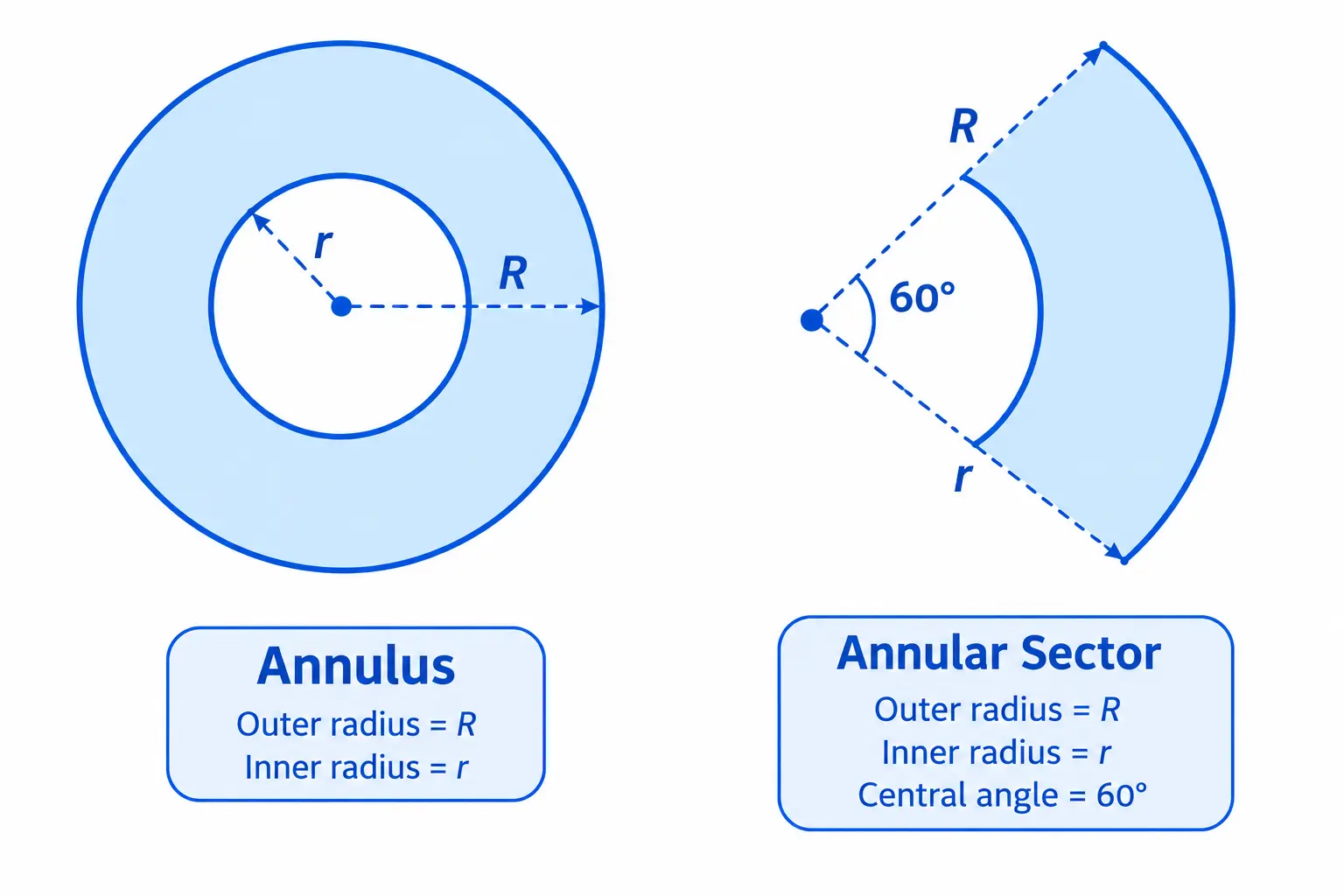
An annulus is the flat ring between two circles that share the same centre. A washer, a round garden path circling a fountain and a pipe’s end face are all annulus shapes.
- R is the outer radius (centre to the outside edge).
- r is the inner radius (centre to the inside edge).
A = π × (R² − r²)
In plain words: find the big circle’s area, then subtract the hole.
Worked example: R = 5 m, r = 3 m
A=π(25−9)=16π≈50.2655 m2
A common mistake
Do not write π(R − r)². That treats the ring as one circle whose radius equals the ring’s width. For this example it gives 4π ≈ 12.5664 m², far from the correct 50.2655 m². Square each radius first, then subtract. The inner radius must also be smaller than the outer radius.
Annular sector
An annular sector is a slice of a ring. Multiply the annulus area by the same fraction used for sectors:
A = (θ ÷ 360) × π × (R² − r²)
For R = 10 m, r = 6 m and θ = 60°:
A=(60/360)π(100−36)=64π÷ 6≈33.5103 m2
Where you might use it
Annulus calculations suit pipe cross-sections, circular paths, washers and ring-shaped flower beds. Annular sectors suit curved garden borders, sections of a circular stage and fan-shaped paving.
How to Find the Radius of a Circle
The Circle, Semicircle and Quarter Circle shapes start from the radius, so you may need to work it out first.
| If you know | Formula | Example |
|---|---|---|
| Diameter (d) | r = d ÷ 2 | d = 20 m → r = 10 m |
| Circumference (C) | r = C ÷ (2π) | C = 20π m → r = 10 m |
| Area(A) | r = √(A ÷ π) | A = 100π m² → r = 10 m |
Once you have *r*, enter it with the correct unit. The calculator does not work backwards from an area to a radius, so use the formula above for that, then check the answer by running the radius through the tool.
How the Circle Area Formula Is Derived
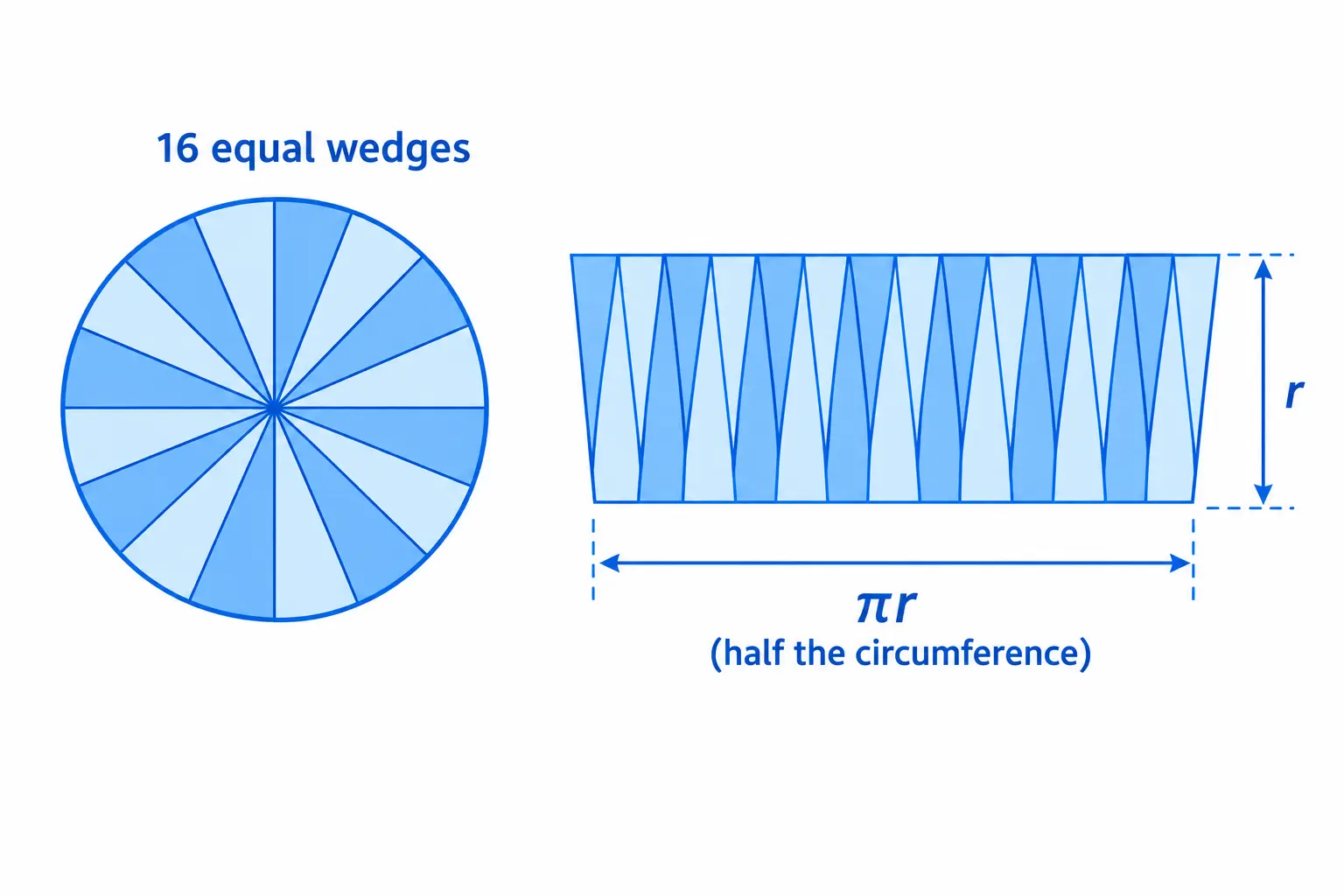
Imagine cutting a circle into many thin wedges, like very thin pizza slices. Lay them side by side with the points alternating up and down. The result looks like a lumpy rectangle.
The more wedges you cut, the straighter the edges become. In the limit:
- The height is the radius, *r*.
- The base is half the circumference. The full circumference is 2πr, so half is πr.
Area of a rectangle = base × height:
A=πr×r=πr²
Common Area Units Conversions
| From | To | Multiply By |
|---|---|---|
| Square metres (m²) | Square feet (ft²) | 10.7639 |
| Square feet (ft²) | Square metres (m²) | 0.09290304 |
| Square metres (m²) | Square yards (yd²) | 1.19599 |
| Square metres (m²) | Acres | 0.000247105 |
| Square metres (m²) | Hectares | 0.0001 |
| Acres | Square metres (m²) | 4,046.8564 |
| Hectares | Square metres (m²) | 10,000 |
Always check whether the unit you are converting from is a length unit or an area unit. Length units (metres, feet, miles) convert by a simple factor. Area units (square metres, square feet, acres) convert by that factor squared.
Example: radius 10 m
Area ≈ 314.1593 m², which is about 3,381.58 ft², 375.73 yd², 0.0776 acres or 0.0314 hectares.
The same circle gives different numbers in each unit. That is normal — the underlying area does not change, only the unit used to express it does.
Check Your Answer and Avoid Common Mistakes
Quick sense-checks
- A 90° sector equals a quarter circle.
- A 180° sector equals a semicircle.
- A segment whose chord equals the diameter is a semicircle.
- As an annulus’s inner radius shrinks toward zero, its area approaches the full outer circle.
- Doubling the radius multiplies the area by four, because r is squared.
Mistakes to watch for
- Radius versus diameter. Entering a diameter as the radius makes the area four times too large.
- Wrong angle unit. 90 degrees and 90 grad are different angles. Check the unit selector.
- Degrees versus radians in hand calculations. Use radians in the segment formula.
- Invalid chord. A chord cannot be longer than the diameter (2r).
- Invalid ring radii. The inner radius must be smaller than the outer radius.
- Sector versus segment. A sector touches the centre. A segment is cut off by a chord.
- Mixed units. Do not combine metres and centimetres in one formula. Convert first.
- Wrong unit convention. Confirm which version of any regional or historical unit you are using before relying on a conversion.
- Rounding too early. Keep full digits until the last step, then round once.
How This Calculator Works: Accuracy and Limits
The calculator reads your measurements, converts them to a common internal unit (metres), applies the formula for the selected shape, and converts the area to your chosen unit.
Precision and rounding
It uses double-precision floating-point arithmetic. Computers store numbers in binary, so tiny rounding differences can appear in the last digits. The main result shows up to six decimal places, formatted for your locale, and the displayed value may be rounded. Other panels show fewer decimals, such as three for square feet and four for some land units.
What “Mathematically Exact” means
The label means the formula itself is exact. It does not mean your result is exact in the real world. Rounding, floating-point precision and the quality of your measurement all affect the final number.
Real-world accuracy
If you measured a radius to the nearest centimetre, the area is only as reliable as that measurement. For land purchases, legal boundaries or construction decisions, use professionally verified measurements.
Limits to know
- The calculator does not go from an area back to a radius or an inner radius.
- It does not accept diameter or circumference as inputs, so convert them to a radius first.
- The diagram is a simple illustration, not drawn to scale. Its size on screen says nothing about the real radius, so rely on the number.
- Copy Result uses a fixed format and may not follow your selected output unit.
- PDF export opens your browser’s print dialog and may need popups allowed. Its table is fixed and does not list every unit.
- The price estimator uses an internal table of currency rates, not live exchange rates. Treat its total as a rough estimate, not a valuation or quote.
Frequently Asked Questions
What is the difference between a sector and a segment?
A sector is a slice from the centre to the edge, like a pizza slice. A segment is the region between a chord and the arc, with no centre point involved.
Why do some formulas use degrees and others radians?
Sector formulas come in both forms, as long as you use the matching one. The segment formula includes a sine term, which needs radians. In the calculator you can enter angles in degrees, DMS, radians, grad or mil, so you do not need to convert by hand. To convert manually, multiply degrees by π/180.
Why does the calculator show a different result from what I calculated by hand?
Three likely causes. (1) You rounded π to 3.14 instead of using the full value — for r = 10 m that alone shifts the answer by 0.16 m². (2) You squared the diameter instead of the radius. (3) You mixed units — for example, entering the radius in feet and reading the area in metres without letting the tool convert. Double-check the unit selectors before assuming the calculator is wrong.
What is the difference between area and surface area?
Area is a two-dimensional measurement — how much flat space a shape covers, measured in square units. Surface area is the same idea applied to the outside of a three-dimensional object, and it is the sum of all its face areas. A circle has area; a sphere has surface area. The formulas look similar (a sphere’s surface area is 4πr², four times a circle’s area) but they answer different questions.
Why does the article use 360° for a full circle, and not 2π?
Both are correct — they are the same full turn expressed in different units. 360° is the degree convention, inherited from ancient Babylonian astronomy. 2π radians is the natural unit for calculus and trigonometry, because radians make arc-length and sector-area formulas simpler (the sector formula becomes ½r²θ, with no 360 in it). “Degrees are the default on this page because most people think in them. Radians appear only where the mathematics needs them, such as the segment formula. The calculator accepts both, as well as grad, mil and DMS.”